You finish stitching a design, take it out of the hoop, and… something just looks wrong. The fabric is puckered, the outlines are uneven, or the stitches look nothing like the design on your screen. If you’re wondering, why does my embroidery look bad, don’t blame yourself or your machine just yet. Poor embroidery can result from several things, including the wrong stabilizer, incorrect threading, unsuitable needle choices, or a design file that needs adjustment.

The good news? Most problems can be diagnosed with a few simple checks before you start changing settings or stitching everything again.
Why Does My Embroidery Look Bad How to Fix It
Fixing Messy Embroidery: Pinpoint the Root Problem First
Let me tell you something about a messy stitch-out doesn’t automatically mean you’re doing something wrong. Even an experienced embroiderer can end up with a disappointing result when the fabric, machine settings, and design file aren’t working well together.
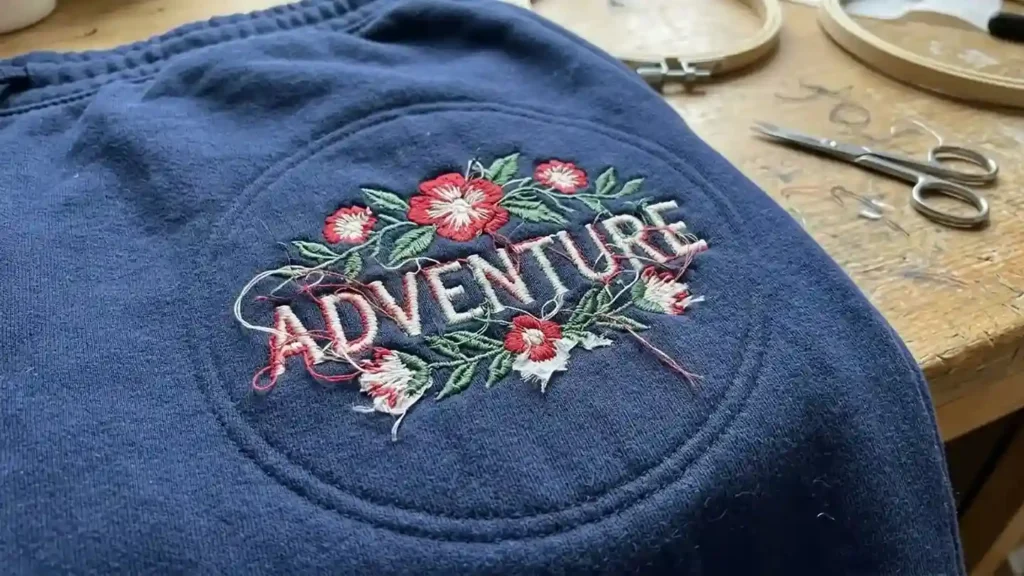
The first step is to identify what actually went wrong. Hand embroidery and machine embroidery have different causes of poor results, so this guide focuses mainly on machine embroidery while keeping that distinction clear.
If you’re asking why does my embroidery look messy, look closely at the finished design before making adjustments. Are the stitches loose? Is the material pulling inward around your design, leaving exposed spaces inside solid fills, or shifting so the borders miss their mark? Every visual defect signals a specific underlying issue.
Quick Troubleshooting Guide
Reference this embroidery troubleshooting guide to pinpoint why my embroidery looks bad prior to adjusting any settings on your machine.
What you see | Possible cause | First thing to check |
Fabric wrinkles around the design | Incorrect or flimsy backing, slack hoop tension, or an overly dense stitch file | Check the backing and hoop tension |
Gaps between stitches | Low coverage, unsuitable stitch settings, or fabric movement | Inspect the fill and test the design on stable fabric |
Loops or tangled thread underneath | Threading errors, bobbin problems, or thread nesting | Rethread the machine and inspect the bobbin area |
Frequent thread breaks | Needle damage, threading issues, tension, or a dense design | Fit a suitable fresh needle and rethread |
Missing stitches | Bent needle, needle mismatch, threading issues, or machine timing problems | Replace the needle and check the machine setup |
Outlines do not line up | Fabric movement, registration issues, or digitizing problems | Check hooping and repeat the design test |
Small lettering looks crowded | Text too small for the stitch details or unsuitable digitizing | Check the design size and stitch construction |
These are starting points, not automatic diagnoses. For example, a gap in the stitching might come from fabric movement or the design itself. Changing thread tension without checking the cause could make the result worse.
How to Find Out Whether the Problem Is Your Machine or Embroidery File
Before you spend time adjusting multiple settings, try a simple controlled test. It can help you separate machine embroidery problems from issues in the design file.

1. Check the Front and Back of the Stitch-Out
Look at both sides of the embroidery. The front shows gaps, uneven outlines, and fabric puckering, while the back can reveal thread nesting, unusual thread balance, and other clues.
Don’t pull the fabric or trim away every loose thread before inspecting it. You want to understand what happened, not just make the finished piece look better temporarily.
2. Check the Basic Machine Setup
Before editing the design, work through these low-risk checks:
- Rethread the upper thread according to your machine’s instructions.
- Remove and inspect the needle; replace it if it is bent, damaged, or unsuitable for the fabric.
- Confirm that the bobbin is inserted and seated correctly.
- Clean lint from the bobbin area as directed by the machine manual.
- Check that the fabric and stabilizer are hooped securely without stretching the fabric unnaturally.
- Confirm that the needle, thread, fabric, and stabilizer are appropriate for the project.
Oh, and don’t change several settings at once. If you adjust the tension, replace the needle, change the stabilizer, and edit the design together, you won’t know which change actually helped.
3. Stitch a Controlled Test
If possible, test the same file on a suitable scrap of the same fabric, using the correct stabilizer and a sound machine setup.
Pay attention to where the defect appears:
- The same flaw repeats in the same part of the design: The stitch file, stitch density, underlay, sequencing, or design construction may need attention.
- The defect changes, appears randomly, or disappears: Threading, needle condition, hooping, stabilizer, or another machine-related factor may be responsible.
- The design works on one fabric but not another: The file may need adjustments for the second fabric, even if the machine is working correctly.
This test does not prove the cause by itself, but it gives you a much better starting point than randomly changing settings. If the problem continues after the basic checks, inspect the specific symptom before making more adjustments.
Common Embroidery Problems and Their First Fixes
Now let’s get into the problems you can actually see on the fabric. The following sections explain what may be causing each defect, what to check first, and when the design itself deserves a closer look.
1. Fabric Puckering Around the Design
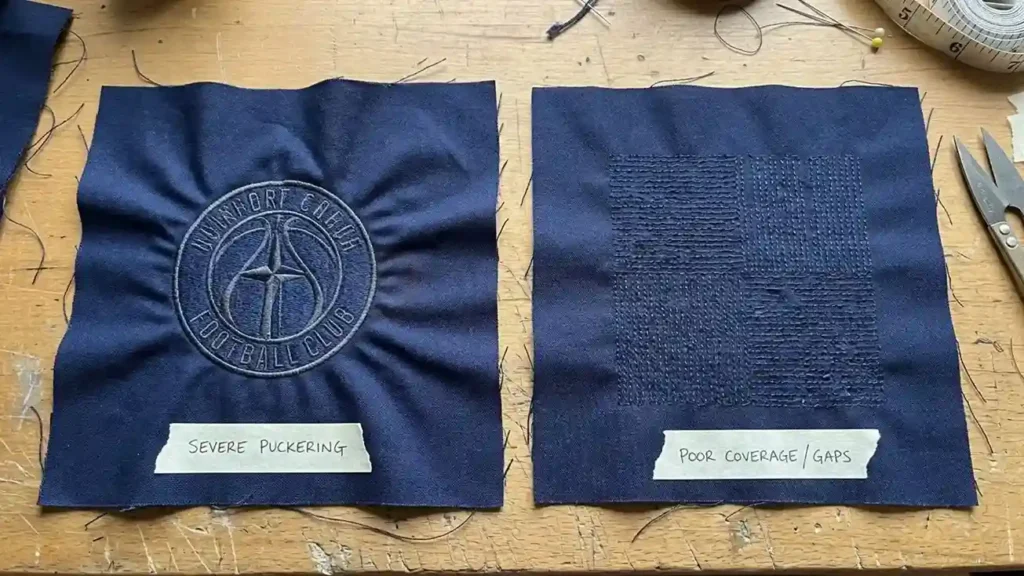
Puckering happens when the fabric gathers, wrinkles, or pulls inward around the stitched area. When asking why does my embroidery look bad on lightweight garments, this distortion is often the primary culprit even if the stitches themselves look neat.
Common causes include embroidery stabilizer problems, embroidery backing problems, loose hooping, excessive stitch density, and a design that pulls the fabric more than it can comfortably support.
How to fix it:
- Verify that your chosen stabilizer type aligns with both the fabric structure and stitch pattern.
- Rehoop the fabric and backing securely without stretching the material.
- Ensure the stitch count and layer thickness remain manageable for your specific garment weight.
- Test the design again on a scrap before repeating it on the finished garment.
If you want to know how to prevent fabric puckering, remember that pulling the fabric tighter in the hoop is not always the answer. Stretching it while hooping can cause the material to contract after it is released.
Also, avoid immediately reducing the machine’s tension to solve every wrinkle. Puckering often comes from stabilization, hooping, or stitch construction rather than tension alone.
When to suspect the file: If the fabric and backing are appropriate, the hooping is secure, and the same area continues to pull inward during repeated tests, the design may need changes to its stitch density, underlay, or pull compensation.
2. Gaps Between Stitches or Poor Coverage
Have you ever stitched a design that looked solid on screen but came out with tiny spaces showing the fabric underneath? It can make a logo look unfinished, especially in larger filled areas or lettering.
If you’re asking, Why does my embroidery have gaps, start by checking whether the gaps appear throughout the design or only in particular sections.
Possible causes include:
- Fill stitches that do not provide sufficient coverage.
- Fabric shifting during stitching.
- Stitch direction or sequencing that leaves visible spaces.
- A design that has not been adjusted for the fabric or intended size.
- Thread or needle issues that cause inconsistent stitch formation.
How to fix bad embroidery with gaps:
First, check that the fabric is stable and properly hooped. Inspect the needle and thread, then run a test stitch-out. If the gaps occur in the same areas despite a stable setup, the file may need adjustments to its fill stitches, underlay, or stitch placement.
Don’t simply increase stitch density everywhere. Too many stitches can make the design stiff, increase thread breaks, and contribute to puckering. The goal is even coverage, not squeezing as many stitches as possible into the fabric.
3. Loose Loops and Bird Nesting Under the Fabric
You finish a few stitches, look underneath, and, oops! there’s a tangled nest of thread. Sometimes it looks like a tiny knot; other times, it’s a whole mess that makes you wonder whether the machine has decided to sew its own design.
This problem is commonly called bird nesting. It frequently happens during cap logo digitizing services when the upper thread is not threaded correctly or the bobbin is incorrectly seated.

How to fix it:
- Stop the machine as soon as you notice the tangle. Continuing to stitch can pull the fabric into the needle plate.
- Carefully remove the fabric if it is safe to do so. If it is trapped, follow your machine manual rather than forcing it.
- Rethread the upper thread with the presser foot raised if your machine’s instructions require it.
- Remove and reseat the bobbin, checking its orientation and thread path.
- Inspect the needle and remove lint around the bobbin area according to the manual.
These checks address common embroidery machine bobbin issues and upper-thread problems without immediately changing tension settings.
When to suspect the file: If the tangle repeatedly occurs at the same dense section of a design after you have checked the threading and bobbin, inspect the stitch file. Excessive density, very short stitches, or overlapping stitch paths can contribute to thread buildup.
4. Embroidery Thread Keeps Breaking
Few things interrupt an embroidery project faster than repeatedly rethreading the machine. If you are trying to figure out why does my embroidery look bad due to constant thread snapping, the root cause is often simple to isolate.
Before you assume the machine needs repair, check the basic causes of embroidery thread breaking.
Common causes include:
- A bent, worn, or unsuitable needle.
- Incorrect threading or thread caught around a spool.
- Damaged, old, or poor-quality thread.
- Excessive tension or a rough spot along the thread path.
- A dense design with many short stitches or abrupt direction changes.
How to fix it:
Start with a fresh needle suitable for your fabric and thread. Rethread the machine carefully, check the spool and thread path, and inspect the bobbin area for lint. If the thread continues to break, follow the manufacturer’s troubleshooting instructions before making tension adjustments.
Avoid pulling the thread aggressively through the machine. A burr on the needle plate or another damaged component may be catching it, and forcing the thread can make matters worse.
When to suspect the file: If breaks repeatedly occur at the same point in the design, particularly in a heavily stitched area, the stitch sequence or density may be contributing to the problem. If breaks happen randomly across different designs, check the machine and thread first.
5. Your Embroidery Machine Is Skipping Stitches
A design can look almost perfect, except for a few missing stitches that leave outlines incomplete or create tiny holes in filled areas. Annoying? Absolutely. But the missing stitches can provide useful clues.
Embroidery machine skipping stitches may result from a damaged needle, an unsuitable needle type, incorrect threading, fabric movement, or a machine issue that requires servicing.
What to check first:
- Replace a bent or damaged needle with one appropriate for the fabric.
- Confirm that the needle is inserted correctly according to the machine manual.
- Rethread the upper thread and check the bobbin.
- Verify that the fabric and stabilizer are secure.
- Test another suitable design to see whether the problem continues.
Let me clear one thing up: skipped stitches do not automatically mean your embroidery file is bad. If multiple designs show the same problem, the needle, machine setup, or machine condition deserves attention first.
If only one file repeatedly skips stitches in the same section, inspect its stitch construction. If basic checks do not resolve skipped stitches, consult a qualified technician rather than attempting unverified timing adjustments.
6. Upper and Bobbin Thread Tension Problems
Sometimes the design looks acceptable from the front but messy from the back. Other times, bobbin thread appears on the top, the upper thread forms loops, or the stitches look loose and uneven.
These can be signs of embroidery thread tension problems, but tension is only one possible cause. Incorrect threading, a poorly seated bobbin, lint, or unsuitable thread can produce similar symptoms.
Use these checks before changing tension:
- Rethread the upper thread, following the instructions for your machine.
- Check the bobbin’s position and thread path.
- Inspect the needle and confirm it suits the fabric and thread.
- Check for lint or obstructions around the bobbin case.
- Compare the front and back of the stitch-out with the tension guidance in your machine manual.
Don’t immediately turn the tension dial in either direction. Different machines and stitch types can produce different thread-balance patterns, so there isn’t one universal setting that fixes every design.
If the threading, needle, and bobbin are correct but the problem remains, make only small, documented adjustments allowed by the manufacturer. Test each change on scrap fabric before stitching the final item.
7. Outlines Are Uneven or Do Not Line Up
Misaligned borders are one of the most visible reasons why does my embroidery look bad on custom apparel. The fill may look fine, but the outline sits slightly outside the design, leaving noticeable gaps.
The issue is often related to registration, the alignment of different parts of a design during stitching.

Possible causes include:
- Fabric shifting or stretching during stitching.
- Loose or uneven hooping.
- A design that has not been digitized appropriately for the fabric.
- Insufficient or unsuitable pull compensation.
- Stitch sequencing or underlay that does not support the design well.
How to improve the result:
First, check that the fabric and stabilizer remained secure throughout the stitch-out. Then repeat the design on a suitable scrap, paying attention to whether the outlines misalign in exactly the same places.
If the problem moves or changes between tests, investigate hooping and fabric movement. If the same outline consistently pulls away from the fill, the design may require changes to its stitch order, underlay, or pull compensation.
This is where embroidery digitizing mistakes can become visible. A design that looks fine on a computer screen may need adjustments to stitch placement and construction to sew cleanly on the intended material.
For logos, small text, and designs with precise borders, professional digitizing can be worth considering when repeated tests show that the file, not the machine setup, is causing the defect.
8. Small Letters Look Blurry, Crowded, or Unreadable
Tiny lettering can turn a professional-looking logo into a jumble of thread. Letters may close up, counters inside characters may disappear, and fine details can become difficult to recognize.
The problem is not always the machine. Some lettering simply contains more detail than the fabric and stitch size can reproduce reliably.

Common causes:
- Text that is too small for the intended stitch type.
- Excessive stitch density in narrow letter shapes.
- Incorrect stitch direction or sequencing.
- A design resized beyond the limits of its original construction.
- Fabric movement or inadequate stabilization.
What to do:
Check the lettering at its actual stitched size, not just when zoomed in on your monitor. Test it on the intended fabric and inspect whether the same letters consistently close up or lose their shape.
If you are wondering how to improve embroidery quality, start by matching the design to the material and final size. Enlarging or shrinking a file without appropriate adjustments can change how the stitches behave.
When the lettering repeatedly fails despite a stable setup, utilizing manual digitizing techniques can help rebuild or adjust the design rather than simply stitching it again.
How to Prevent Common Embroidery Problems Before Your Next Stitch-Out
Fixing a messy design is useful, but avoiding the same problem on your next project saves time, thread, and fabric. A few checks before pressing the start button can make a real difference. Reviewing these embroidery mistakes and solutions beforehand prevents disappointing stitch-outs.
Use this checklist before stitching:
- Fabric: Choose a fabric suitable for the design and its level of detail.
- Needle: Check that the needle type and size suit the material and thread. A wrong embroidery needle can contribute to skipped stitches, thread breaks, and damaged fabric.
- Thread: Use suitable thread and inspect it for damage before starting.
- Stabilizer: Match the backing to the fabric, design size, and stitch coverage. Cutaway, tearaway, and washaway stabilizers each serve different purposes.
- Hooping: Keep the fabric and backing secure without stretching the material unnaturally.
- Design size: Avoid resizing a stitch file excessively without checking whether its construction still suits the new dimensions.
- Machine maintenance: Clean lint and follow the manufacturer’s maintenance schedule.
- Test stitching: Run a sample on similar fabric before committing to the final garment.
One more thing: keep notes about successful combinations of fabric, stabilizer, needle, and thread. If a design turns out beautifully, you’ll have a useful reference for the next time you work with similar materials.
Can You Fix Embroidery After It Has Been Stitched?
Yes, in many cases, but the right approach depends on the defect, the fabric, and how much stitching needs to be removed.
If you’re wondering can you fix embroidery after a disappointing stitch-out, start by deciding whether the problem is cosmetic or structural.
Try these recovery options:
- Loose threads: Trim loose thread tails carefully without cutting the fabric or essential stitches.
- Small gaps: A limited gap may be repairable with a few carefully placed stitches, provided the fabric and design allow it.
- Misaligned outlines: Minor defects may sometimes be covered or corrected, but adding more stitching can make dense areas bulky.
- Puckering: Removing the embroidery may reduce the distortion, but it cannot always restore stretched or permanently damaged fabric.
- Severe thread tangles: Remove the tangled stitches cautiously and inspect the fabric before deciding whether to continue.
How to Remove Bad Stitches Without Damaging the Fabric
If you are wondering how to fix messed up embroidery, turn the garment inside out when possible and use an appropriate seam-ripping tool to remove stitches gradually. Work in small sections, keep the blade away from the fabric, and avoid pulling hard on the thread.

Stop if the fabric begins to snag, the weave becomes damaged, or the stitches are too dense to remove safely. Some fabrics are particularly vulnerable to holes and permanent marks.
If the material is badly damaged or the design would need extensive removal, starting again on a fresh piece may be the safer option. It feels frustrating to waste a garment, but adding more stitches to a damaged area can turn a small problem into a bigger one.
When Is the Embroidery File the Real Problem?
You’ve checked the needle, threading, bobbin, stabilizer, and hooping, but you’re still asking why does my embroidery look bad. You’ve stitched a controlled test, yet the same defect appears in the same place. What now?
This is when the design file deserves closer attention.
A stitch file contains more than the visual outline of a logo. Its stitch types, density, underlay, direction, sequence, and compensation affect how the design behaves when it meets real fabric.
If the file was created for a different material or size, it may not produce the best results on your project. A design intended for a stable, flat garment, for example, may need adjustments before it works well on a cap or another challenging surface.
Relying on on-demand embroidery digitizing services in USA can help when the design requires complete changes to its stitch construction rather than another round of machine adjustments.

Get Your Next Stitch-Out Back on Track
When you’re asking why does my embroidery look bad, remember that the finished design is giving you clues. Puckering, gaps, thread breaks, and uneven outlines each point toward different possible causes.
Check the machine setup first, test the design on suitable scrap fabric, and look for patterns before making major adjustments. If the same defect keeps returning in the same place, the stitch file may need professional attention.
And if your design needs that extra attention, send it to ZDigitizing for review. Ask about a 50% discount on an eligible digitizing order (if you are a new customer) when contacting the team, and confirm the offer’s availability and terms before ordering.
Your next stitch-out doesn’t have to be perfect on the first try, but with the right diagnosis, it can be a whole lot better.