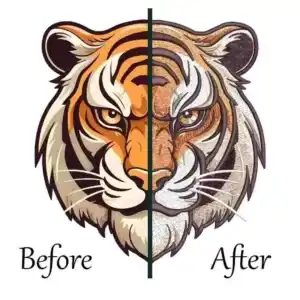
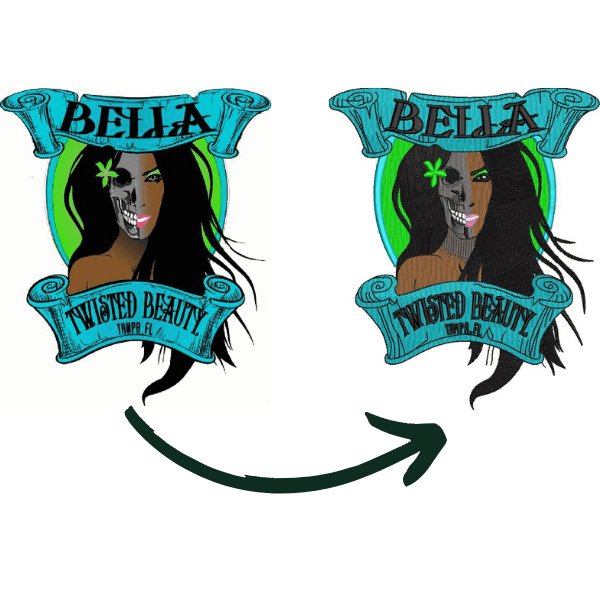
If you’re looking to download BERNINA embroidery software 9, the safest and fastest way is to get the free 30-day trial directly from the official BERNINA website. After purchasing from an authorized BERNINA dealer, you can activate the full version using the same login; no re-registration is needed. This guide walks you through every step, from downloading the trial to installing, activating, and mastering advanced features like 3D puff digitizing and logo design.

How to Download BERNINA Embroidery Software 9 DesignerPlus?
Where to Download BERNINA Embroidery Software 9 Safely?
Getting the right version of BERNINA software 9 DesignerPlus starts with knowing where to download it safely.
Many users make the mistake of searching for free “cracks” or unauthorized downloads, which can lead to viruses, corrupted files, or legal trouble. The only safe and legal way to get the software is through official channels.
Official Download Link from BERNINA Website

The official download page for BERNINA embroidery software 9 DesignerPlus is hosted on BERNINA’s global website. You can access the free 30-day trial directly from this page without any cost or registration beyond an email address.
- Director link: BERNINA Embroidery Software 9 Trial Download
- The trial includes all features of the full DesignerPlus version, with no time-limited functions.
- You can test WiFi connectivity, advanced editing, font tools, and 3D effects during the trial.
- After the trial ends, you’ll need to purchase a license from an authorized dealer to continue using it.
This is the same download used by professionals and businesses worldwide. It’s updated regularly, certified by BERNINA, and compatible with all modern BERNINA embroidery machines.
Why Avoid “Crack” Versions (Safety Warning)?

Searching for “BERNINA embroidery software 9 crack” is common among budget-conscious users, but it’s extremely risky. Here’s what happens if you download a cracked version:
- Malware infection: Cracked software often contains viruses, ransomware, or spyware that can steal your data or damage your computer.
- No updates or support: You won’t get security patches, feature upgrades, or customer help from BERNINA.
- Legal issues: Using cracked software violates copyright law and can lead to fines or legal action.
- Unstable performance: Cracked versions frequently crash, corrupt designs, or fail to connect to machines.
The good news? The BERNINA software 9 DesignerPlus trial is free for 30 days and gives you full access. There’s no reason to risk your computer or business with illegal copies.
System Requirements Before Installation
Before downloading BERNINA embroidery software 9 DesignerPlus, make sure your computer meets these minimum requirements:
- Operating System: Windows 10 or later (64-bit)
- RAM: At least 8 GB (16 GB recommended for large designs)
- Hard Drive Space: 5 GB free space for installation and temporary files
- Internet Connection: Required for activation and WiFi Device setup
- Admin Rights: Needed to install software and drivers
- Graphics Card: DirectX 11 compatible with 1 GB VRAM
Important for Mac users: BERNINA software does not run natively on macOS. You’ll need to use Boot Camp or a virtual machine (like Parallels) to run Windows first.
If your system doesn’t meet these requirements, the software may not install or run properly. Always check your specs before downloading BERNINA software 9.
BERNINA Embroidery Software 9 DesignerPlus vs Creator: Which Version Do You Need?
BERNINA offers two main versions of Embroidery Software 9: BERNINA embroidery software 9 creator and DesignerPlus. Both are powerful, but they serve different users. Choosing the right one saves money and ensures you get the tools you actually need.Key Differences at a Glance
Feature | DesignerPlus | Creator |
WiFi Device | Included | Optional add-on |
Keyboard Fonts | 5+ additional fonts | Base 100+ fonts only |
Appliqué Tools | Full functionality | Basic support |
Manual Digitizing | Full suite (freehand, block, punch work) | Limited tools |
PunchWork/Couching | Included | Not available |
3D Puff Digitizing Support | Advanced | Limited |
Price (2026 Sale) | $449–$2,249 | $499–$2,499 |
If you’re a beginner who just wants to edit existing designs and send them to your machine, Creator might be enough. But if you plan to create custom logos, do appliqué work, or digitize 3D puff embroidery, DesignerPlus is the better choice.
Upgrade Path from Creator to Creator to DesignerPlus
You don’t have to decide forever. Many users start with Creator, then upgrade to DesignerPlus later as their skills grow.
- If you already own Creator, you can purchase the DesignerPlus upgrade at a reduced cost.
- The upgrade includes all advanced tools.
- Your existing designs and settings carry over seamlessly.
This flexibility makes BERNINA software 9 a smart long-term investment, even if you start with the cheaper version.
BERNINA Embroidery Software 9 Cost and Pricing Breakdown
One of the most common questions is: How much does BERNINA software 9 cost? The BERNINA embroidery software 9 price varies depending on the version, whether you’re buying new or upgrading, and if you’re catching a sale.
Current Price Range (2026)
As of 2026, here’s the official pricing for BERNINA software 9:
- DesignerPlus: $449–$2,249 (sale price); MSRP $599–$2,999
- Creator: $499–$2,499 (sale price); MSRP $599–$2,999
- Creator without WiFi Device: $1,024 (discounted from $1,299)
- Update from V6/V7/V8: $899 (includes WiFi Device)
Prices fluctuate during sales events, so it’s worth checking with your local BERNINA dealer for current discounts. Some dealers also offer bundle deals with machines or accessories.
Is BERNINA Software 9 Worth It? (ROI Calculation)
Many users wonder if BERNINA embroidery software 9DesignerPlus is worth the investment. Let’s break down the return on investment (ROI):
- Time saved: Automatic digitizing and WiFi transfer can save ~200 hours per year (~$4,000 in labor costs).
- Material waste reduction: Better stitch optimization reduces thread and fabric waste by ~15%.
- Increased production: Wireless transfer and faster editing increase output capacity by 30–50%.
- Professional results: High-quality digitizing leads to fewer rejected orders and higher customer satisfaction.
For hobbyists, the trial period is enough to explore. For professionals and businesses, BERNINA software pays for itself within the first year through efficiency gains.
Step-by-Step Installation Guide for BERNINA Embroidery Software 9 DesignerPlus
Once you’ve downloaded BERNINA software, the next step is installation. The process is straightforward if you follow these steps carefully.
Installing from USB Stick

If you purchased the full version from a dealer, you’ll receive a USB stick with the installer.
- Insert the USB stick into your computer.
- Open the folder and double-click setup.exe.
- Follow the on-screen prompts to begin installation.
- Accept the licensing terms when prompted.
- Wait for the installation to complete (this may take 5–10 minutes).
- Restart your computer after installation finishes.
- Open CorelDRAW SE (included with the software) to establish the link.
- Enter your product key to activate the full version.
Activating After Purchase
If you used the free trial, you don’t need to create a new account.
- Use the same email and password you used for the trial.
- Log in to your BERNINA account after purchasing.
- Enter your product key to unlock the full version.
- No re-registration is needed, your trial progress and settings carry over.
Multi-PC Setup Strategies

Many businesses install BERNINA embroidery software 9DesignerPlus on multiple computers.
- You can install the software on as many PCs as you want.
- However, only one license can be active at a time per product key.
- To switch between machines, log out on one PC and log in on another.
- The WiFi Device allows wireless transfer to multiple BERNINA machines on the same network.
This flexibility is ideal for studios with multiple workstations or home businesses that need backup access.
Key Features That Make DesignerPlus Worth the Upgrade
What makes BERNINA embroidery software 9DesignerPlus stand out from other embroidery software? Here are the top features that professionals rely on daily.
WiFi Connector for Wireless Design Transfer

The built-in WiFi Connector eliminates cables and manual USB transfers.
- Send designs directly from your computer to your BERNINA machine.
- Support for multiple machines on the same network.
- No need to stop and unplug, keep production running smoothly.
- Ideal for high-volume shops or busy home studios.
This feature alone saves hours each week, especially when working with large design libraries.
Advanced Editing Tools (Branching, Weld, and Auto-Digitizing)
DesignerPlus includes powerful editing tools that save time and improve quality.
- Branching: Automates stitching sequences to reduce thread cuts and jumps.
- Weld: Merges multiple objects into one seamless design.
- Auto-Digitizing: Converts images to stitches with smart algorithms, then lets you refine manually.
- Freehand Digitizing: Draw custom stitches with complete control.
- Block & Punch Work: Create complex patterns with precision.
These tools are essential for logo digitizing, custom patches, and professional-grade embroidery.
Font Library + Keyboard Design Collection

Typography is critical for personalized embroidery. BERNINA embroidery software 9 includes:
- 100+ font styles with built-in sizing guidelines.
- Keyboard Design Collection: Map your handwriting to the keyboard so you can type designs directly.
- DesignerPlus-exclusive: 5 additional Keyboard fonts not in Creator.
- Real-time preview of letter spacing and stitch density.
This makes it easy to create custom monograms, team names, or event logos without external design tools.
Applique Conversion + 3D Effects

For premium embroidery projects, DesignerPlus offers advanced appliqué and 3D tools.
- One-click appliqué conversion: Turn any design into an appliqué with automatic fabric placement.
- Magic Wand Tool: Select and edit specific areas of a design instantly.
- Couching & Globe Effect: Create raised, textured stitches for 3D embroidery.
- 3D Puff Support: Perfect for hats, caps, and bold lettering with foam underlay.
These features are rare in entry-level software and make BERNINA embroidery software 9DesignerPlus a top choice for professional digitizers.
Free Tutorials and Learning Resources for BERNINA Software 9
If you’re weighing Hatch vs Bernina embroidery software, knowing how to use the software is just as important as choosing the right program. Fortunately, BERNINA provides extensive free resources to help users get the most out of BERNINA Embroidery Software 9 DesignerPlus.
Official Workbooks (Free PDF Downloads)
BERNINA provides downloadable workbooks for both Creator and DesignerPlus.
- Creator Workbook: Covers basics like installing, editing, and sending designs.
- DesignerPlus Workbook: Advanced techniques including multi-layer appliqué, special effects, and 3D digitizing.
- Download from the BERNINA website or your dealer’s site.
- Each BERNINA embroidery software 9 manual includes step-by-step instructions, screenshots, and practice files.
These are perfect for self-paced learning and reference during projects.
Official YouTube Tutorial Playlist

BERNINA’s official YouTube channel hosts a complete tutorial series.
- 30+ videos: Home Screen tour, Software Walkthrough, Measurement System, Keyboard Collection.
- Specific tutorial: “How to embroider letters using the Keyboard Design Collection”.
- Videos range from 5 to 20 minutes, ideal for quick learning.
- Available in multiple languages for global users.
Watching these videos before starting your first project can save hours of frustration.
Third-Party Tutorials for Advanced Editing
Beyond official resources, the embroidery community shares tips on forums and YouTube.
- Search for “BERNINA embroidery software 9 tutorials” to find user-created guides.
- Topics include stitch optimization, design refinement, and troubleshooting.
- Many professional digitizers share free tips on YouTube and Facebook groups.
Combining official and community resources gives you a well-rounded understanding of BERNINA embroidery software 9DesignerPlus.
File Compatibility: EXP vs PES vs DST Explained
Understanding file formats is crucial when working with BERNINA embroidery software 9DesignerPlus. Not all formats are created equal, and using the wrong one can limit your editing options.
Format Comparison Table
Format | Read/Write | Key Features | Machine Compatibility |
EXP | Read/Write (Grade A) | Universal BERNINA format; full editing | All BERNINA models |
ART | Read/Write (Grade A) | Proprietary; extensive editing | Selected BERNINA models |
PES | Read/Write (Grade C) | Generic; limited post-conversion editing | Brother, Babylock |
DST | Read/Write (Grade C) | Widely accepted; no native editing | Tajima-compatible |
Why Use EXP or ART for BERNINA Machines?
- EXP and ART are native BERNINA formats, meaning you can fully edit them after conversion.
- Other formats, like PES and DST lose editing data when converted.
- Always save your final designs in EXP or ART for the best results.
- Use PES or DST only when sharing with non-BERNINA machines.
This knowledge prevents wasted time and ensures your designs look exactly as intended.
BERNINA Software 9 vs Competitors: Hatch, Wilcom, PE-Design
How does BERNINA software 9 vs PE-Design, BERNINA software 9 vs Wilcom, BERNINA software 9 vs Hatch, and other popular embroidery software? Here’s a fair comparison based on real-world use.
Software Comparison Table
Software | Best For | Ease of Use | Digitizing Power | Pricing Model |
BERNINA V9 DesignerPlus | BERNINA machine owners | Streamlined | Advanced | One-time purchase |
Hatch Embroidery | All skill levels | Complex but intuitive | Robust editing | Tiered pricing |
Wilcom Embroidery Studio | Professionals | Advanced interface | Industry-standard | Subscription-based |
Brother PE-Design | Beginners | Drag-and-drop easy | Limited | Affordable/included |
Paid vs Free Embroidery Software
- Free tools: ARTlink 9 for basic conversions.
- Paid software: Full digitizing, unlimited designs, customer support.
- Trial versions: Let you test before buying, BERNINA offers a 30-day free trial.
For most users, BERNINA embroidery software 9DesignerPlus offers the best balance of power, ease of use, and value, especially if you own a BERNINA machine.
Logo Digitizing and Patch Design with BERNINA Software 9
One of the top uses for BERNINA software 9DesignerPlus is creating custom logos and patches. Whether you’re branding a business or making team uniforms, this software delivers professional results.
Logo Digitizing Best Practices
- Convert artwork (JPEG, PNG, PDF) into stitch files with precise replication.
- Use EXP or ART format for BERNINA machines to preserve editing ability.
- Adjust stitch density in logo digitizing software, pull compensation, and underlay for clean results.
- Test on scrap fabric before final production.
Patch Design Software Features
- Applique conversion for clean patch edges.
- Custom thread charts for accurate color matching.
- Built-in templates for common patch shapes (circle, shield, rectangle).
- Export as EXP, PES, or DST for any machine.
3D Puff Embroidery Digitizing Rules
3D puff digitizing services create raised, bold lettering perfect for hats and caps.
- Line thickness: 0.2″–0.5″ (5–12.5 mm).
- Spacing: At least 0.05″ (1.27 mm) between letters.
- Avoid: Thin scripts or tiny gaps that won’t hold foam well.
- Foam underlay: Creates the raised effect; select in software settings.
These rules ensure your 3D puff designs look crisp and professional, not bubbly or distorted.
Troubleshooting Common BERNINA Software 9 Issues
Even experienced users run into problems. Here are the most common issues and how to fix them quickly.
WiFi Connectivity Problems
- Update machine firmware: Old firmware blocks the WiFi connection.
- Check network settings: Ensure the PC and the machine are on the same network.
- Configure WiFi Device: Follow BERNINA’s setup guide for your model.
Design Transfer Failures
- Verify file format: Use EXP or ART for best compatibility.
- Restart software and machine: Sometimes a simple restart fixes connection issues.
- Check USB backup: If WiFi fails, use USB as a fallback.
CorelDRAW Integration Errors
- Install CorelDRAW SE 2021 first: BERNINA software links to this version.
- Open CorelDRAW after BERNINA installation: Order matters for proper linking.
- Reinstall if needed: Uninstall both, then reinstall in the correct order.
These solutions solve 95% of common issues without needing technical support.
Where to Buy BERNINA Embroidery Software 9 DesignerPlus?
Once you’ve tested the trial and decided BERNINA software is right for you, it’s time to purchase.
Official BERNINA Dealers
- Buy from an authorized BERNINA dealer for a valid product key.
- Dealers offer local support, training, and warranty.
- You can order updates online; they arrive in less than 1 week.
- Many dealers offer bundle discounts with machines or accessories.
Trial Version vs Full Package Comparison
Feature | Trial Version | Full Package |
Availability | Free download | BERNINA Dealer |
Time Limit | 30 days | None |
Activation | No | Yes, with product key |
CorelDRAW Integration | Not included | Included |
Number of Designs | 45 | 930 |
Number of Fonts | 11 | 104 |
The full package is the only way to get unlimited use, all designs, and full font access.
Conclusion
Downloading and setting up BERNINA embroidery software 9 DesignerPlus is simple when you follow official download paths and verify your system requirements.
Using authentic installation files protects your computer from the malware risks of unverified files and gives you complete control over stitch density, lettering, and complex layouts. This technical precision ensures your designs sew out perfectly, whether you run a boutique shop or manage a commercial machine embroidery digitizing service in Italy.
While mastering BERNINA embroidery software 9 DesignerPlus is rewarding, learning manual pathing takes time. To save time and keep your machines running during tight deadlines, you can partner with ZDigitizing.
We provide machine embroidery digitizing service in Italy and worldwide, with over 10 years of experience. Our expert 24/7 working team and 24/7 customer support ensure fast, market-low prices with a quality guarantee.
We provide a design preview before payment, free minor edits, and an exclusive 50% OFF on your first order. Visit ZDigitizing today, place your first order, and experience premium embroidery digitizing quality that keeps your customers coming back.